How hard is it to make an app? An honest answer for 2026
Building a simple app is no longer the hard part. Getting users, taking payments, answering support and passing app store review is. Here is how hard each path really is, and where to start.
By Saad Aziz · Last verified on
- Easiest path
- A no-code AI app builder: describe the app, it builds and hosts it
- Store accounts
- Apple $99 a year; Google Play $25 once (October 2026)
- Apple review time
- Apple says it reviews 50% of submissions in under 24 hours, 90% in under 48
- New Google Play accounts
- Personal accounts need a closed test with 12 testers for 14 days
- The hard part
- Users, payments, support and upkeep, not the first build
How hard is it to make an app?
Making a simple app is not hard anymore: with a no-code AI app builder, a non-developer can build a working first version without writing code. Learning to code or managing a developer is much harder. The truly hard parts come after the build: finding users, taking payments, support, maintenance and app store review.
How hard is it to make an app, by path?
How hard it is depends almost entirely on the path you choose. There are three: use a no-code or AI app builder, learn to code, or hire a developer or agency. Each trades your time against your money and control.
| Path | Difficulty | Time to a first version | Cost | What you can build |
|---|---|---|---|---|
| No-code or AI app builder | Low: you describe it in plain language | Hours to days for a simple app | Free plans to start; paid plans from $16–$18 a month billed yearly on Base44 and Bolt.new (October 2026) | Web apps with sign-in, a database and AI features; some builders also make store apps |
| Learn to code | High: months of learning before you build with confidence | Slowest at first; fastest once you can code | Mostly your time; courses and tools vary | Anything, including native features and complex logic |
| Hire a developer or agency | Medium: the work is managing scope, not coding | A simple, well-scoped app MVP in 12–16 weeks, per agency Fruitful Code | Highest. For scale, the US median software developer salary was $135,980 in May 2025 (BLS) | Anything you can specify and pay for |
For most first-time founders, coaches and creators, an AI app builder is the right start: you find out whether people want the app before you spend months or a salary on it. See our list of the best no-code app builders.
What makes one app harder to build than another?
An app gets harder to build with every person, payment and outside system it has to handle. A single-screen calculator is easy. An app where users sign in, pay, share data with each other and connect to other services is a real project on any path.
| Feature | Difficulty | Why |
|---|---|---|
| Pages, forms and content | Low | Every builder handles these well |
| Sign-in and saved data per user | Low to medium | Easy to add, but access rules must be right |
| One AI feature | Medium | Needs testing on messy real inputs and a cost limit per user |
| Payments and subscriptions | Medium | Checkout, receipts, failed cards, refunds and tax |
| Users interacting (chat, marketplace, sharing) | High | Permissions, moderation and many edge cases |
| Native phone features (camera, offline, health data) | High | Needs a native app and passes store review |
| Health, money or children’s data | High | Legal rules on top of the technical work |
The practical takeaway: make your first version from the low and medium rows only. Most ideas still work without the high rows, and you can add them once people are paying.
What is actually hard about making an app?
The hard part of making an app is everything around the build: getting people to use it, getting them to pay, helping them when it breaks, and keeping it working. AI tools have made the first version fast. They haven’t made the business part go away.
This is why two people with the same app can get very different results. The one who already knows their customers, answers them quickly and fixes what they report usually wins, even with a simpler app. Plan your time for these parts from the start.
| Part | Why it is hard | What helps |
|---|---|---|
| Getting users | An app store or website with no audience gets no visits. Building it doesn’t bring people | Start with an audience you can reach: followers, clients, a community |
| Taking payments | Checkout, receipts, failed cards, refunds, tax and local payment methods | A builder or payment provider that handles tax and retries |
| Support | Every user with a question needs an answer, often within hours | A help page, a support inbox and saved answers from day one |
| Maintenance | Phones, browsers and the services you use keep changing; things break without you touching them | A hosted builder that updates the platform, or a developer on call |
| Store review | Apple and Google review apps against their rules, and new Google Play personal accounts must run a closed test first | Read the rules before building; plan the test period into your launch |
| Security and privacy | User data must be protected, with clear privacy and terms pages | Sign-in on every private page, database access rules and generated legal pages |
I have an app idea. Where do I start?
Start by writing your idea as one sentence: who it is for, what it does, and what they would pay. Then check that someone already pays for something similar. A competitor charging today is proof people want it, not a reason to stop.
- Talk to five people who would use it, before building anything. Ask how they solve the problem today.
- Cut the idea to one job. A meal photo that returns calories is a first version; a full nutrition coach is version five.
- Pick a path from the table above, usually a no-code AI app builder for a first test.
- Decide how it makes money before you build, so the app has a place for it.
If you already have an audience, such as clients, followers or a community, build for them first. Ask them directly what they would pay for, and invite the ones who answer to test the first version. An idea with ten people waiting for it is easier to launch than a better idea with nobody.
Need ideas with real competitor prices? See our AI business ideas.
How to make an app, from idea to first users
- 1
Write the one-sentence idea
Who it is for, what it does and what they pay. If you can’t write it, the idea isn’t clear enough yet.
- 2
Check demand
Find two or three apps or services people already pay for that solve the same problem, and talk to five potential users.
- 3
Choose your path
Use an AI app builder unless you already code or have a budget for a developer. You can always rebuild later.
- 4
Build the smallest version
A landing page, sign-in and the one feature that does the job. Leave out settings, admin screens and extras.
- 5
Test it with real people
Give it to five to ten people from your audience. Watch where they get stuck and fix those first.
- 6
Add payments, legal pages and support
Payments in test mode first, terms and privacy pages, and a way for users to reach you.
- 7
Launch on the web first
A web app needs no store review, so you can launch and fix things the same day. Add store apps once people use it.
- 8
Get your first users
Post to your audience, message past clients, share in communities you belong to. Answer every early user quickly.
Is it harder to make an iPhone or Android app?
Yes, a store app adds work on top of the build: developer accounts, store listings, privacy forms and review. None of it needs code, but it takes time and has fixed costs.
- Accounts: the Apple Developer Program costs $99 a year, and a Google Play developer account costs $25 once, as of October 2026.
- Review: Apple says it typically reviews at least 50% of submissions in under 24 hours and 90% in under 48 hours. Incomplete submissions take longer or get rejected.
- Testing: Google Play personal accounts created after November 13, 2023 must run a closed test with at least 12 testers for 14 days before going live.
- Rules: Apple’s guidelines ask that an app offer features beyond a repackaged website, so a plain web wrapper may be rejected.
If you want a store app without code, see our AI app builder page.
How long does it take to make an app?
A simple app takes hours to days with an AI app builder, and a well-scoped app built by a developer team takes months; Fruitful Code puts a simple MVP at 12–16 weeks. Getting it ready to charge for, with payments, legal pages and testing, adds days to weeks on any path.
- The build: hours to days on an AI app builder for a simple app; much longer if you are learning to code.
- Testing with real users: plan at least a week to watch people use it and fix what confuses them.
- Payments, legal pages and support: set up before launch, not after the first customer asks.
- Store apps: add the review time and, for new Google Play personal accounts, the 14-day closed test.
What mistakes make making an app harder than it needs to be?
Most first apps struggle for the same few reasons, and none of them is a lack of coding skill. They are decisions made before or during the build.
- Building for months before showing anyone, then finding out nobody wants it.
- Starting with a native app when a web app would have tested the idea faster, with no store review.
- Adding features instead of fixing the one that matters.
- Leaving payments, legal pages and support until launch week.
- Hiring a developer on a vague brief, then paying for every change of mind.
- Choosing a tool you can’t leave without checking what happens to your data and users if you move.
Each of these is cheap to avoid at the start and expensive to fix later. If you only take one thing from this guide: put the app in front of real people as early as you can stand to.
Make the app, and the hard parts around it
Starty is our product. Describe your app in one sentence, and Starty builds it with the parts that are actually hard already in place: payments, emails, support, legal pages and analytics.
- Builds the landing page, app and its own database, with sign-in, payments and legal pages in test mode until you review
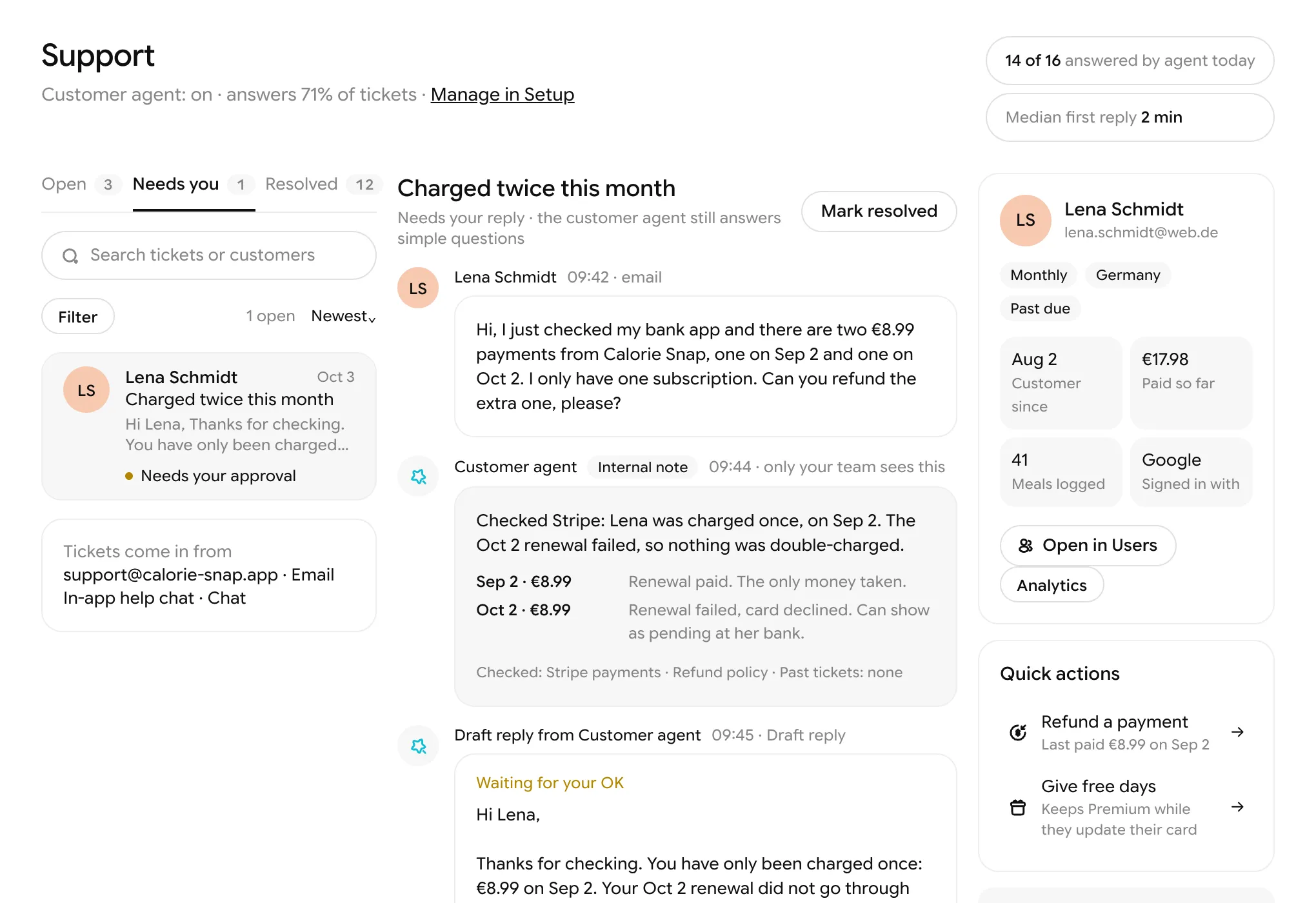
- A customer agent answers your users in chat and email, and hands over to you when needed
- Web apps by default, plus native iPhone and Android apps submitted under your own developer accounts
- Nothing sends, charges, refunds, publishes or deletes without your OK
Related guides
Where every fact comes from
Official pricing pages, docs, announcements and named studies, checked on October 23, 2026. Where a company doesn’t list something, we say so rather than guess.
- Apple Developer Program enrollment
- Apple: App Review
- Apple: App Review Guidelines
- Google Play: developer account registration
- Google Play: testing requirements for new personal accounts
- Base44 pricing
- Bolt.new pricing
- Lovable pricing
- US Bureau of Labor Statistics: software developers
- Fruitful Code: how hard is it to create an app?
Questions people ask
Yes. No-code and AI app builders let you describe an app in plain language and build it for you, with sign-in and a database included. You will still need to test it carefully and handle payments, support and launch.
Write the idea as one sentence: who it is for, what it does and what they pay. Check that people already pay for something similar, talk to five potential users, then build the smallest version with an AI app builder and test it with them.
Start on the free plan of an AI app builder: as of October 2026, Base44, Bolt.new and Lovable all have one. Free plans are enough to build and test. A custom domain, live payments and store publishing usually cost money.
It takes some paperwork rather than skill. You need a $99-a-year Apple Developer account, a store listing and privacy details, and your app must pass Apple’s review, which Apple says handles 90% of submissions in under 48 hours. Apps that only repackage a website may be rejected.
Use an app builder first if you are testing whether people want the app: it is faster and far cheaper. Hire a developer when you need features the builder can’t do, handle sensitive data, or have paying users who depend on the app.
A web app is enough for most first versions: no store fees, no review, and it works on phones. Add a native app when your users expect one, or when you need features like push notifications or the camera inside the app.
Enter your email to join Starty’s private beta. We’ll email you your access, and you can start building for free.
No. You describe what you want, or fork an idea, and Starty builds it. You review and approve; you never have to open the code.
No. Starty takes no fee on your revenue. Payouts go to your bank account, and Starty earns from plans and credits.